Showing posts with label figure. Show all posts

Monday, 22 February 2010

Lt. Kara Black - Kit Review


A nice little present arrived today!

Lt. Kara Black by Studio McVey, a wonderful 35mm figure sculpted by Kev White, with the concept art produced by Sam Wood.

Studio McVey is run by Mike and Ali McVey, husband and wife and two extremely talented painters and modellers. Any long time Games Workshop fans will recognise the name as Mike was the original Eavy Metal team, producing many classic paint jobs, including much of the renowned "red period", along with some classic dioramas such as the Dark Angels chapel, Horus versus the Emperor and the Lizardmen execution pit (all of which can be seen on the Studio McVey website). Mike's work was certainly a great inspiration for me growing up, and both Ali and Mike's recent work continues to inspire, influencing my own ever evolving style.

Bandana On!

The figure itself is cast in a nice grey resin and comes in 6 parts including the base insert, legs, torso, weapon, ammo hopper and ammo feed. The concept of female with giant weapon in hand (oh no he didnt!) reminds me of a large scale figure Mike painted long ago, a Catachan female with heavy bolter, sculpted by one of the Perry brothers (I forget which) to be precise!


What is immediately apparent is the quality of casting, there are very few imperfections, and those that do exist are minor at best. With very few mould lines, the quality of sculpting really shines through, with nice smooth lines - very much a figure painters dream!

But don't take my word for it, check out the incredible job Mike and Ali have produced on their blog!

Limited to 750 casts (each with a numbered certificate), you best get your skates on and head on over to the Studio McVey website to order yours today, before it's to late!

Having looked through the range of figures available, and having seen first hand the quality of sculpts and casts, I certainly plan to pick up some more soon!

Saturday, 20 February 2010

Ariadna Zouaves Sapper - WIP Painting

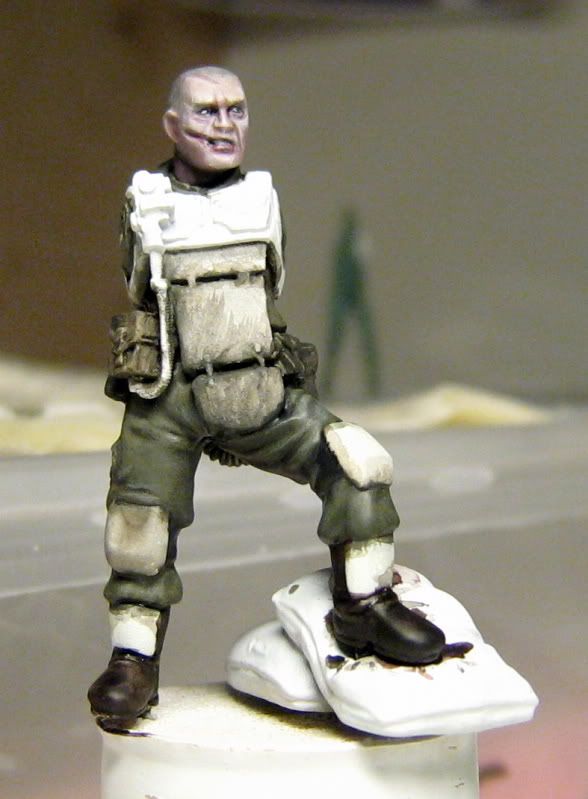
Finally got started on painting this guy this week, with much of the progress coming in a couple of hours today!


The inspiration for the paint scheme comes from Call of Duty - Mordern Warfare 2's Task Force 141 and the gear they wear in the Quarry multiplayer map.

Particularly pleased with how the helmet, goggles and face have come out. The face looked like it was gonna be a pain in the ass due to being hard to get at with the brush, but was pretty easy in the end. The goggles were a bit of a play about that came off nicely and I think they look properly see-through to the helmet, while still reflective.

I'm going to give him a spray with some dullcote through the airbrush before applying the metalics to remove the sheen from some of the washes and glazes.

First time painting in about 2 months so a little rusty again, but it's been good fun.

I also recently found some daylight bulbs that fit in my Ikea painting lamps so these have helped a lot too when it comes to painting. Unfortunately they don't seem to be as helpful at the moment for photo taking! Think I'll need to adjust to them so sorry for the poor pics in the meantime.

Hopefully finish him this evening and can then finish a commission I'm working on and look at starting up these:


Can't wait! :D

Wednesday, 3 February 2010

To Infinity and Beyond! - New Figs Inbound

So with a welcome and healthy pay day last week, I decided to treat myself to a new figure (I know, I have loads of unpainted stuff already but this one will be painted, promise!). The figure in question comes from a range that I had caught glimpses of occasionally but never truly checked out...

Now I won't lie, I'm a bit of a GW loyalist. I've not painted a non-GW miniature in over 10 years, though I have bought some for bits and pieces for conversions (some Victrix Napoleonics). However, this figure was just too good a sculpt to pass up and at a cool £6, I couldn't resist!

So what is the figure? Well it's an Infinity Ariadna Zouave Sapper.


So what swayed me to broaden my figure painting horizons? Well just look at the pose and detail of the sculpt, it's perfect! It's a one figure diorama!

I particularly the base that comes with the figure too. It adds a lot to the narrative as well as creating a better silhouette for the figure.

Anyone have any experience with Infinity figures? Anything to look out for (bad flash, miscast sections, rough surfaces etc)?

Also, you may have noticed a bit of a re-design for the blog, would love to know what you all think. Does it look better and have a better, easier to navigate layout?

Saturday, 5 December 2009

Warhammer (etc) Figure Sculpting Tutorial - The Basics

Realised I never posted this here. Had originally done the tutorial for my good friend Grey_Death over at The Painting Corp (great blog, go check it out if you haven't already!), but thought I'd re-post here for completeness sake seeing as I'm trying to catalogue tutorials here.


Following his recent acquisition of some clay shapers, coupled with his first forays into sculpting with Green Stuff, Grey_Death was kind enough to ask me to contribute a tutorial or two on sculpting. Having never written a proper tutorial before, I hope you will all forgive the inevitable mistakes I will make along the way!

This tutorial will cover some old ground and hopefully a few new insights as well. First, the old ground:

Tools

There are a few core sculpting tools that all sculptors should have. Below is a list of the tools I use along with their uses (See image 1. below).

  • 1. Pin Vice - Used to drill holes for pinning and creating holes (for mesh, gun barrels etc).
  • 2. Jewelers Files - Nice, small files for filing down plastic/resin/metal/cured putty. Good for making sharp edges in cured putty.
  • 3. Clay Shapers - Used to shape putty and smooth surfaces. I mainly use the white chisel headed one to do most of the shaping and smoothing, with the bullet headed one being used for concave shapes and creating folds etc.
  • 4. Metal Sculpting Tools - These are from a cheap Gale Force 9 set. The tool with a half round on one end and a blade on the other gets used a lot to blend putty into other surfaces (cured putty/resin/metal/plastic etc). The pointed tool is used to create fine details and small holes, hair, rips etc.
  • 5. Scalpel - Used to cut plastic/resin/cured putty into shape and to remove any excess putty.
  • 6. Paper Clips - Used as pins for pinning figures and as armatures for sculpting over.


Above is also a list of a selection of putties I use for sculpting (Image 2.):

  • 1. Fimo (Champagne) - I haven't actually used this yet, but it comes highly recommended. A good material to practice with as it doesn't cure unless baked. When working with it, keep your work sealed in a jar in a shaded area to avoid any dust getting on the putty, or any accidental smudging.
  • 2. Green Stuff - The putty of choice for most sculptors. A 2 part epoxy resin that requires mixing before use. Can be mixed in different ratios in order to achieve a variety of sculpting times. The more yellow, the softer the mix will be and the longer the curing time, the more blue, the harder the mix will be and a shorter curing time. Knead thoroughly to ensure no lumps of yellow or blue otherwise they will ruin the finish as they won't cure properly.
  • 3. Brown Stuff - Like Green Stuff, but a much firmer putty and more solid when cured, making it better for doing hard edged surfaces and mechanical parts.
  • 4. Milliput - Super Fine - Used to bulk work on bases and also for making "Milliput washes" (milliput mixed with water), which are used to fill small impurities in resin and metal sufaces, and also in putty work. Washes can also be used in a thicker mix to fill small gaps and seams in sculpting and conversion work.
  • 5. 1200 Grit Wet Dry Paper - Not a putty, but another tool used in conjunction with the putty. Used to sand surfaces to get a super smooth finish. I tend to sand all surfaces with this before painting in order to have a perfect surface to paint over. When sculpting, it can be used to sand out and seams and get a flush surface between putty and plastic/resin/metal/cured putty.

Now that, that is out of the road, on with the sculpting!

The Subject

The subject for this tutorial is a Victrix plastic Napoleonic Frenchman (example 1. below) which I am converting into a Rogue Trader. As the Victrix figures are a good deal smaller and thinner than Games Workshop's plastic figures, I will be using Green Stuff to bulk the figure out and to sculpt new feet in order to add some height to the figure.


The Sculpting

As can be seen in example 2 above, I have started by creating a rough base shape to work over for the feet. This was created by removing the original figures feet and putting two paper clip pins into the legs, running all the way down into the cork base. The rough shape of the feet was then built up over the paper clips and left to cure overnight. I always use a cork as a holder for sculpting projects as it is easy to push the pinned feet of models into, providing a nice large surface to hold onto that keeps your fingers away from the putty while you work on it. Champagne corks are best as they are nice and wide and have a nice flat, wide base to provide a stable surface for your work to stand on when you leave it to cure.


Putty is then added to the base work (See example 1 above) in order to add volume to the shape along with some basic details. The putty is then shaped and smoothed to form the shape of a booted foot (See example 2 above). No folds or creases are added on the boot at this stage as I find it easier to add these seperately once the shape is formed and cured. Where the freshly applied putty meets cured putty from the previous stage, the edges are smoothed into the previous layer using the half round end of the metal sculpting tool (See example 3 above). This is done with the metal tool as clay shapers aren't hard enough to press the putty flush, therefore leaving a fine seam that can show up in painting. The result of the smoothing with the metal tool can be seen in image (See example 4 above).


I began bulking out the legs, applying putty to one area at a time in order to provide room to work (1). The edges were smoothed with a metal tool before the bullet tipped clay shaper was used to add some folds around the knee and groin (See example 2 above and 1 below).


There are a few small imperfections in the putty on the thighs (See example 1 above), these will be filled with a milliput wash later and then sanded smooth. Putty was then applied to bulk out the jacket, pressed on into shape first with fingers (See example 2 above). The putty was then shaped as above, using the chisel tool to shape and smooth, the metal half round to smooth the edges into the plastic, and the bullet tool to create some light folds (See example 3 above).


As you can see, there is still a lot of work to do before the figure is finished, there is still a fair bit of shaping and volume to be added, along with the all important details, however these will be covered at a later time in a future tutorial on sculpting details.

Thanks again to Grey_Death for the opportunity, and thank you for reading. I hope that whether you are just starting out at sculpting, or if you have been sculpting for a while now, you will have picked up something of use here.

Cheers,

Dante

Saturday, 7 November 2009

Fleshing Things Out - Flesh Painting Tutorial

About time I added another post here!

As you can no doubt tell from the dodgy pun of the title (sorry!), this post is concerned with the method I use to paint human flesh.


I've received a lot of questions on forums lately asking me about the recipe's and methods I use to paint flesh (specifically caucasian flesh), so I thought rather than reply every time with the same response, I would put together a short (text heavy for the time being - not had a chance to do step by step pics yet) tutorial.

Prep Work

With any painting project, it is always worth doing some good preparation to ensure that you don't make any mistakes etc that you would have to correct later, or that could frustrate you/ruin the look of the finished figure.

The first thing worth doing when painting flesh is to look at reference pictures. Skin tone's vary from person to person, regions and climates. The picture below is a perfect example of this - notice that even among caucasian people, the tones can be quite different.


Paint Selection

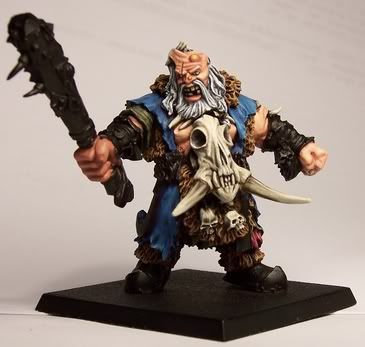
While most paint manufacturors make "flesh" colours, and these can be good for painting armies in a quick fashion, often they are quite orangey, or pinkish in appearance, leading to an un-natural looking figure (for example the skin on my old ogre hunter below (2004), while nice enough, doesn't look very realistically human).


Therefore, for my current method of painting flesh, I like to look to other, more realistic looking tones for skin.

Base Colour

My current colour of choice as a base for all caucasian flesh is Games Workshop's Dheneb Stone paint from their foundation range. A nice "off-tan" colour, it also has the added benefits of great coverage, thins well and takes paint and washes over it very well.


Shades

The colours used for shading flesh go a long way to helping define the mood, character and overall look of your finished figure. Greener shades can be used to create sickly looking characters, while red and pink shades can help define a healthy, "softer" looking character.

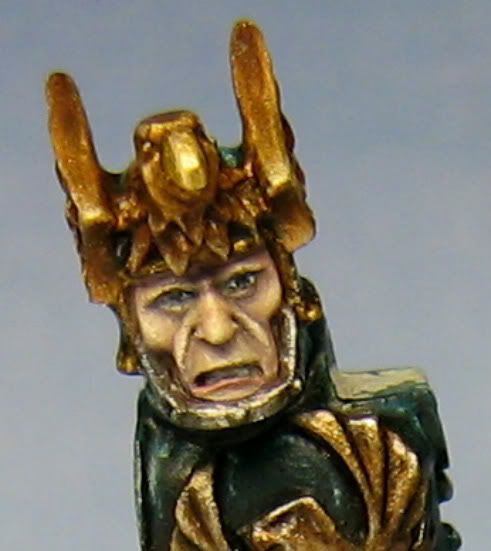
While the shades I use for painting flesh are dependent upon the figure for the reasons outlined above, most commonly I use a mix of Vallejo Warlock Purple from their Game Colour range, and Charadon Granite, again from Games Workshop's foundation range, along with a little Dheneb Stone mixed in. The figure in the picture below has had the above mix applied over a Dheneb Stone base.


Toning

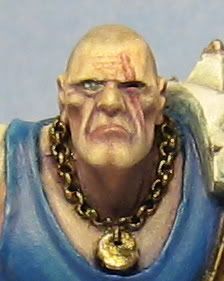
Beyond simply shading the flesh on your figure, it's also a good idea to add some toning in order to add a bit more interest to the skin. On the Cadian stormtrooper I'm working on at the moment for example (pictured at the start of this post), I have added some toning to the face using a mix of Baal Red and Devlan Mud washes from Games Workshop mixed with a little Vallejo Matt Medium (to remove the shine). The reason for this is that the figure will be set in a winter scene and I wanted a cold look to the face, hence the pink cheeks.

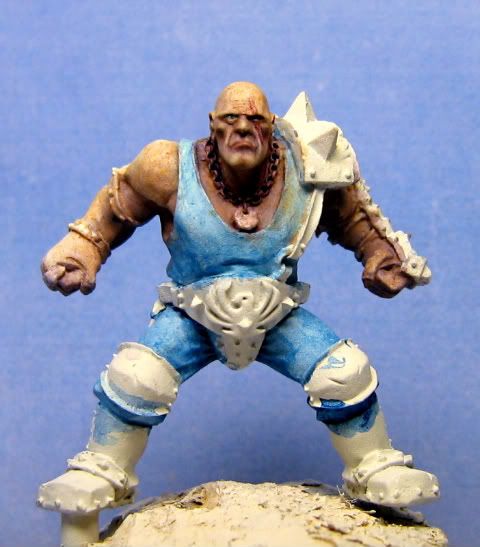
While this isn't an immediately noticeable effect that can be picked out on it's own, it adds considerably to the overall appearance of the mini. On Griff Oberwald's face (below) for example, toning was applied using a darker purpleish tone to make him appear aged.


Highlights

For highlights, as always it is simply a case of lightening the base colour. In this case, Dheneb Stone is first re-applied in a few thin coats to build a base for the highlights. Following this, P3 Menoth White is added to Dheneb Stone in increasing quantities for a few stages of highlighting. There is no definitive placements for highlights as it very much depends upon the figure, look you are aiming for etc, however as a general rule, the areas to focus upon are the brow, tip of the nose, tops of the cheeks and the tip of the chin.


Application

In order to replicate the translucent qualities of real human skin, the shades and highlights are best applied in very thin layers. Thin the paint until it is almost was like in consistency, get some on your brush, then dab the side of the brush lightly against a tissue a few times until most of the moisture is removed and then apply.

Hopefully that covers the main thrust of how I approach painting flesh. As with anything, there are many approaches that can be taken, this is the one that works for me, but you might find something else more suitable to your own style. Above all, don't be afraid to experiment with colours, tones and techniques to get the effect you desire.

Would love to hear your comments on your own experimentation and techniques for painting flesh.